- 3 Posts
- 115 Comments


 1·12 days ago
deleted by creator
 5·19 days ago
I use wireguard. One network is behind cgnat so i just get that client to connect outbound to the other client to initiate the tunnel (instead of trying to connect to IT) and it works just fine.
I did try tailscale once upon a time but it was so clunky and confusing for me…i just wanted to simply access my entire networks remotely without any overhead
 42·1 month ago
Stupid question.
Does this apply to what you write and upload on the Arduino IDE to your boards? Or just whatever you publish on their website/ cloud?
Came here to suggest this. Glad its getting the exposure it deserves
Not long after this post, BentoPDF made an appearance
deleted by creator

Having just installed StirlingPDF this week, can someone please explain the pros and cons of both?
 10·2 months ago
So many different questions here. However…
A knife can be used to kill but also cook a nice meal.
Is it worth stating which companies own which vpns? I saw a TIL that mentions a select few companies own most VPNs

I think they mean powerline adapters
I have joplin but personally found myself using Nextcloud Notes 100% of the time. I just need very basic, quick markdown notes
Ticks all your boxes
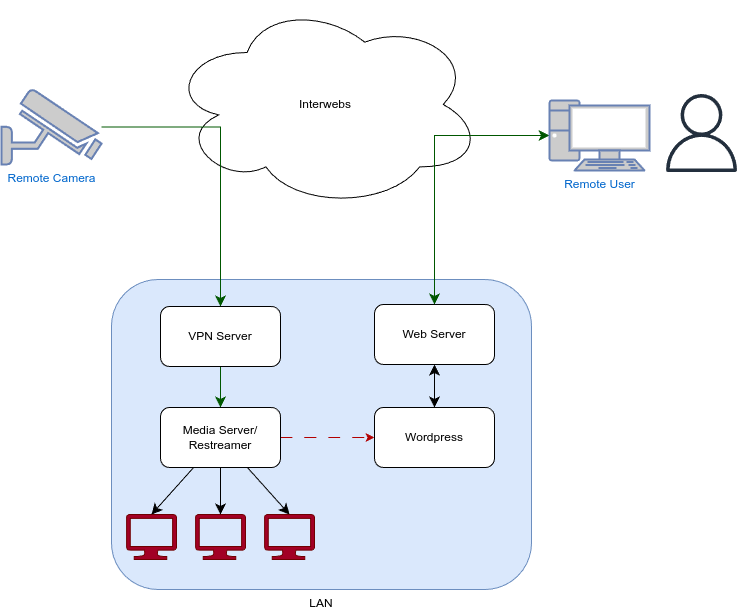
Raspberry Pi:
- Install wireguard (as a server)
- Set up a peer/client config
- Open wireguard port on the router
MiniPC:
- Install wireguard (as a client)
- Add server config and connect to server
- Verify connection
- Ensure connect on boot
Points to note:
-
Configure them both locally and ensure you have a connection before you move the pi to another country
-
If you’re behind a CGNAT on one network, that’ll change some things. That network will have to be the client. (If both are behind CGNAT, you’re out of luck and cant use this - will have to be tailscale or other method)
-
If using a domain name make sure its always pointing to your ip (in case it’s not static)
-
I think if you set allowed ip as 0.0.0.0/0 on the client it’ll route all traffic.
Edit:
Saw your comment about just having qbt use the vpn. Check this guide out
Does it grant “backdoor” access?
They do? I dont recalling having needed to pay for it and dont need to log in. I even have a degoogled phone… maybe it used to be free
My experience has been OSMAnd feels “heavy”. It is a large app but i guess there’s so much it just feels sluggish. But it has the most features which I use as my go to reference.
Organic maps (and CoMaps) feels sleeker and quicker but when im on the road I want traffic updates.
For the last few years my go to is Magic Earth for the traffic data.
My issues with OSM is a lot of missing information and incorrect roads. I have contributed updates but when I’m driving and I come across something wrong there’s no way for me to flag it so i can revisit it later.
All in all I’m still torn between them all and still waiting for the day one ticks all the boxes.
More often than not I find I end up using Google Maps to get me out of a wrong or missing turn or to the final destination because finding places on OSM isn’t there yet. If OSM gets something wrong when I’m driving I don’t have time to faff around trying to fix it so GMaps takes over the rest of the way and I dislike having to do so
 291·4 months ago
Reckon it was because of the UK supplying over 500 RAF spy flights over gaza?

Syncthing or rsync?
Alovoa is free and opensource.
Its the only one i know that isn’t out to make money
Damn